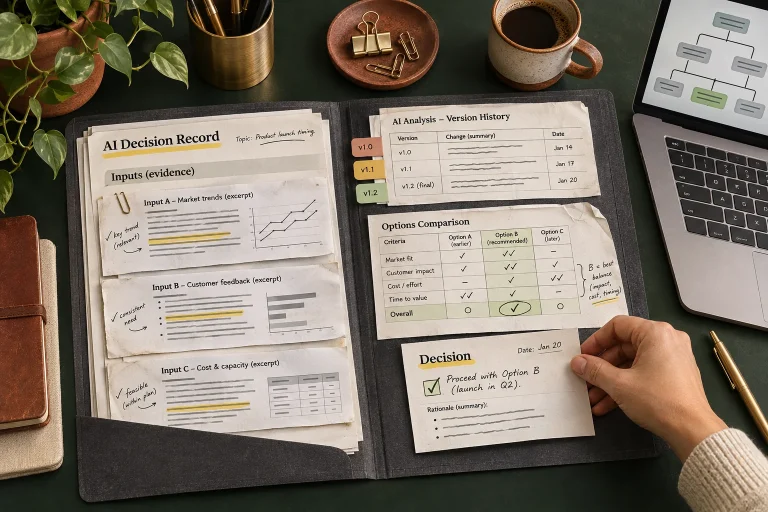
Before asking AI to draft a customer reply, assemble an evidence card containing the customer’s question, verified account facts, applicable policy, remaining uncertainty and the commitments a reviewer may authorize. Give the draft writer those references and require it to leave unsupported promises out. Review the card alongside the reply before sending.
The card answers a narrow operational question: what can this reply truthfully say now? It is useful for service updates, delivery questions and routine policy explanations. A complete case history is rarely necessary, and a general policy document cannot establish what happened on a particular customer’s job.
Keep the card small enough to inspect
Use links and short factual statements rather than pasting entire inbox threads. Each fact needs a source location and an as-of time where it can change. Separate a customer assertion from a verified business record. Both matter, but they serve different purposes when deciding what to tell the customer.
| Card field | What to record | What it prevents |
|---|---|---|
| Question being answered | One clear customer request and case identifier | A fluent reply addressing the wrong issue |
| Verified facts | Relevant record IDs, source links and timestamps | A historical note presented as today’s status |
| Policy basis | Current approved section and effective version | An old or unrelated policy used as authority |
| Unknown or disputed facts | Specific gap and person who can resolve it | An assumption disguised as a confirmed fact |
| Permitted commitment | Exact promise or concession authorized for this case | An invented refund, deadline or guarantee |
| Review and release | Reviewer, approved draft version and send status | Confusion between a suggestion and an actual response |
Keep unnecessary personal details out. If the reply concerns an appointment window, the assistant may need the appointment reference and approved availability, without unrelated payment or personal records. Limit retrieval to information the reviewer and intended recipient are allowed to use.
Distinguish evidence from useful background
A help article can explain how a process normally works. It cannot prove that a shipment left the warehouse or that a technician accepted a booking. Use the customer answer library for approved general explanations and the case’s authoritative system for current facts.
When two sources disagree, record the conflict on the card. Ask the responsible person which source controls that fact and whether it needs correction. Do not tell the model to choose whichever account sounds more plausible. A polished compromise between conflicting dates can create a third date that neither system supports.
NIST’s Generative AI Profile identifies confabulation and overreliance risks. Its recommendation to verify generated sources and citations applies directly here: a source label in a draft is a starting point for inspection. The reviewer still opens the referenced record and confirms that it supports the sentence.
Prepare a hypothetical delivery reply
Suppose a customer asks whether replacement equipment will arrive on Thursday. The order record says it is awaiting dispatch. An earlier internal email says the supplier hoped to ship Tuesday. There is no carrier acceptance or confirmed delivery commitment.
The card records “awaiting dispatch” as the verified order status, identifies the supplier email as an earlier expectation and lists arrival date as unknown. It names the purchasing coordinator as the person to obtain an update. The permitted reply can acknowledge the question and explain that dispatch confirmation is being checked. It cannot promise Thursday delivery or claim the parcel is already in transit.
If the business authorizes a follow-up by 3 p.m., record who accepted that commitment and the relevant date and time zone. The AI should not add that deadline because it makes the reply sound more helpful. If no update deadline is authorized, leave it out and obtain one through the normal review process.
Draft within the evidence boundary
Ask the assistant to produce the customer draft plus a short internal list connecting each factual claim to a card field. Keep that internal list out of the message sent to the customer. It helps a reviewer spot a paragraph whose assurance has no factual basis.
Allow a draft to state that a detail remains unconfirmed. The guide to letting an assistant acknowledge missing knowledge provides a useful foundation. The goal is an accurate answer and a clear next step, without unnecessary internal process detail.
Treat customer wording as a request, never as authority to change policy. A message saying “confirm my full refund now” does not create refund approval. OWASP recommends limiting tool privileges and independently validating high-impact or external actions. Keep drafting permission separate from send permission and from any power to modify the customer’s account.
Recheck changing facts at release
Decide which card fields need a fresh lookup just before sending. Dispatch status, available appointments and stock may change while a draft waits for review. A static policy explanation may have a longer useful life, provided its version remains current. The process owner should set those rules for the actual workflow.
When the draft changes a material fact or commitment, review the new version. Store the approved message ID and actual send result with the case. A saved draft is not a sent reply, and an approval comment on an older draft does not explain the final message.
For later reconstruction, connect the card to the broader AI decision evidence pack. During a pilot, review unsupported claims, stale facts and promises removed by reviewers. Those observations reveal whether the evidence card improves the work or merely adds another form that nobody checks.